
Those blind spots can cost a lot, especially in competitive categories where clicks aren't cheap and sales cycles are long, like in B2B software for example. One WordStream study of more than 15,000 Google Ads accounts found the average account wasted about $1,127 a month. Here are 12 things about the search terms report that might surprise you, plus what we recommend doing about them.
1. Some Search Terms Aren't What Anyone Typed
For searches through Google Lens, AI Mode, AI Overviews and autocomplete, Google's documentation now says the search term shown is its best approximation of the user's intent. So the "search term" in your report might be Google's guess at what someone meant, not what they actually typed. Keep that in mind before you build keywords or ad copy around an oddly phrased query.
For example, say someone points Google Lens at a printed Gantt chart pinned to their office wall. Your search terms report might show something like "gantt chart wall printout timeline software tool." It reads more like a list of what Google saw in the photo than anything a person would type, but it's sitting in your report right next to real searches. Or say you're bidding on the keyword "project management software." or "project management software."
Someone asks Google's AI Mode: "My team of 12 engineers keeps missing sprint deadlines. What tools would help us plan better?" Your ad shows, and the search terms report lists something like "team 12 engineers missing sprint deadlines plan better tools." It's a chopped-up version of the question that nobody actually typed. Google summarized a conversation into a phrase.
This matters more than it might seem. If a strange, conversational query shows up in your report, it may reflect how Google interpreted a photo search or an AI Mode conversation, not a phrase anyone typed into a search box. Building an exact match keyword around it may not get you much, because people may never search those exact words.
It also changes how you should think about negatives. If an approximated search term looks irrelevant, check whether the underlying intent is actually a fit before you block it. A query that reads oddly could still come from a qualified buyer using one of the newer ways to search.
2. A Big Chunk of Your Spend Is Hidden
In September 2020, Google changed the report to only include terms that a significant number of users searched for, citing privacy. One review of five accounts found that in three of them, more than 30% of traffic came from hidden terms after the change, up from under 6% before. Google restored some visibility in 2021, but terms below the threshold still get grouped into an "Other" row that shows the cost without the searches behind it.
That hidden traffic isn't cheap, either. In 2025, an independent study analyzed over $20 million in Google Ads spend across nearly 14 million clicks and 933 campaigns, and found that hidden searches had 52% higher cost per click and 44% lower click-through rates than visible ones. In niche categories, we'd expect the hidden share to be even bigger. B2B software is a good example: buyers tend to search in long, specific phrases, and many software categories are small to begin with.
The hidden searches are often the long, specific ones. For a software company, that might be a search for a particular use case or integration. Those can be the most interesting searches to see, and unfortunately they're exactly the kind the threshold tends to hide.
The practical takeaway is to treat the report as a sample, not a complete record. The patterns you find in the visible terms are a good guide to what's happening in the hidden ones.
3. You Can Measure Your Own Blind Spot
Compare your total campaign spend with what the visible search terms add up to. The gap between the two is how much you can't see. If it's large, tighten your match types and add negatives at the theme level. Blocking "jobs," for example, also stops job-related searches you'll never see listed.
To find the number, compare total cost at the campaign level with the sum of cost across the visible rows in the search terms report for the same date range. Doing this campaign by campaign is more useful than looking at the whole account, since some campaigns will have much bigger blind spots than others.
Track the number over time, too. If the hidden share jumps after you loosen match types or turn on a new feature, that's a sign Google is matching you to more long-tail traffic that you can't review.
To help you get started, we're sharing our own negative keyword list. It includes phrase match negatives grouped by theme, like employment, bargain hunting, media and file searches, social sites, and adult or spam terms. Review it before you apply it, though. Depending on what you sell, words like "free," "pdf" or "work" might be exactly what your buyers are searching for.
4. Performance Max Has a "Private" Bucket
In early 2025, advertisers spotted a "private search terms" row in Performance Max with a note defining those as queries searched by fewer than 50 unique users over the past 90 days. It was one of the only times Google put an actual number on its privacy cutoff.
That label didn't stick around. Today, the PMax search terms reports in our accounts show the same "Other search terms" row you'll find in Search campaigns. The tooltip simply describes it as the total of search terms that resulted in an impression but "were not searched on by a significant number of people." Google doesn't say what "significant" means, so there's no way to know exactly where the line is.
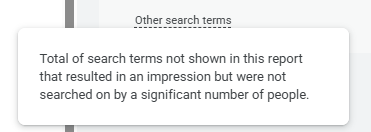
You can't see the individual queries inside that bucket, but you can see how much of your PMax traffic falls into it. A large private share suggests your campaign is reaching a lot of very specific, low-volume searches, which is common in niche categories like specialized B2B software.
If that share keeps growing while lead quality drops, it's worth reviewing your PMax audience signals, brand exclusions and negative keywords to keep the campaign from drifting too far from your core buyers.
5. The Most Useful Column Is Hidden by Default
The Keyword column shows exactly which of your keywords matched each search term, but you have to turn it on yourself. We always add it, because without it you're looking at a list of searches with no idea which keyword triggered them.
With the Keyword column on, patterns jump out quickly. You might find that one broad match keyword is responsible for most of your irrelevant traffic, or that a search you assumed was coming from one ad group is actually triggering a keyword somewhere else in the account.
You can add it through the Columns menu in the report. Save it as part of a custom column set so it's there every time you open the report, not just once.
6. AI Max Added Another Column You Have to Turn On
If you're running AI Max, the report now has a "Search terms and landing pages from AI Max" view, an "AI Max" match type filter and a Source column you have to add yourself. The Source column tells you whether a search term came from your own keywords or from AI Max's expansion. If you pull data through the API, the same information lives in the search_term_match_source segment.
This matters because AI Max can match your ads to searches based on your landing pages and assets, not just your keywords. Without the Source column, it's hard to tell which search terms you chose to target and which ones Google found on its own.
Once it's on, compare performance by source. If AI Max's matches turn into qualified pipeline at a similar rate to your keyword traffic, the expansion is earning its keep. If not, you have a clear place to start tightening things up.
7. Filtering for AI Max Undercounts It
Google's documentation notes that when you filter the match type for "AI Max," the report may show lower numbers because that filter doesn't include "Other search terms." If you're reporting AI Max results to leadership, that filter alone will understate them.
This is easy to miss in a monthly report, especially when someone builds a quick pivot table off a filtered view. If AI Max looks like it's underperforming, double-check the numbers at the campaign level before drawing conclusions or turning it off.
The same caution applies anywhere the report is filtered. Since hidden searches land in the "Other" row, any filter that leaves that row out will show you less than the full picture.
8. AI Max Can Take Credit for Your Exact and Phrase Traffic
If you don't have a broad match version of a keyword, AI Max treats it as both its original match type and broad match. That blurs match type reporting and can give AI Max credit for traffic your exact and phrase keywords were already earning. The fix most practitioners recommend is adding broad match versions of your core keywords. Our guide to finding the best SEM keywords breaks down how each match type works.
This can make it look like AI Max is driving results it didn't actually create, which can lead to the wrong budget decisions. It also makes it harder to judge your exact and phrase match strategy on its own.
If you're testing AI Max, set a baseline first. Note how your exact and phrase keywords were performing before you turned it on, so you can tell whether AI Max is adding new traffic or just relabeling traffic you already had.
9. Google Says to Wait Two Weeks Before Adding Negatives
This one goes against every PPC instinct. Google recommends waiting at least two weeks after turning on AI Max before making changes like adding negative keywords, so you're working with enough reporting data. You may still want to block anything obviously off-base, like job searches, but give the rest some time.
Google frames the wait as a way to give your reporting enough data to be useful. Search term data from the first few days of a change tends to be noisy, and acting on it too early can lead you to block searches that would have worked out.
In practice, plan for a short stretch of less efficient spend when you first turn AI Max on. Set expectations with stakeholders ahead of time, and keep a close eye on budget so the learning period doesn't get expensive.
10. You Can Block Landing Pages, Not Just Search Terms
The AI Max view shows the headline and landing page served alongside each search term. If a page keeps matching the wrong searches, you can add it as a negative URL right from the report, the same way you'd add a negative keyword.
This is especially useful for sites with pages you never want to send paid traffic to. A B2B software site, for example, usually has careers, documentation, support and customer login pages. If AI Max starts matching searches to those pages, a negative URL stops it at the source.
It's worth reviewing the landing page side of the report as regularly as the search terms themselves. A page that keeps showing up for the wrong searches may also need clearer copy, so it's obvious who the page is for.
11. Search Terms Insights Doesn't Show Cost
Search Terms Insights groups searches into themes, including some that don't appear individually in the main report. But it doesn't include cost data, so it can tell you what people searched for without telling you what those searches cost you.
That makes Insights a good tool for spotting trends and new themes, but not for deciding where to cut spend. A theme can look big in Insights while costing very little, or look small while taking up a real share of your budget.
Use Insights to find ideas, then check the main report and your campaign data before making any budget decisions.
12. A Search Term in PMax Can Be a Clue
Google only prioritizes a Search campaign over Performance Max when the query is identical to an eligible keyword in your account. If a valuable search keeps showing up in PMax instead of Search, adding it as a keyword is often the fix.
This comes up a lot in accounts running both campaign types. If a high-intent search, like a product comparison, keeps showing up under PMax, it may be because no Search keyword matches it exactly, so PMax is free to compete for it.
Adding that search as an exact match keyword in your Search campaign gives you more control over the bid, ad copy and landing page. It also makes reporting cleaner, since you'll see that search's performance in one place.
Bonus: Microsoft Ads Uses Different Labels
If you run campaigns on both platforms, Microsoft's version of AI Max shows expanded matches under an "AI optimized" match type, and its new search term landing page report includes "Delivered match type" and "Final URL source" columns. Comparing match type data across the two platforms takes a little translation.
If you manage both platforms, it helps to build a simple mapping of how each one labels match types and sources so your reports line up. Otherwise, it's easy to compare numbers that aren't actually measuring the same thing.
So What Should You Do About It?
None of this means the search terms report isn't worth your time. If anything, the part you can see matters more. And staying on top of it pays off. Across 30 paid search accounts, Seer Interactive found that companies were wasting an average of 15% of their budget on irrelevant keywords. In WordStream's study, accounts with at least one negative keyword had an average conversion rate of 13%, compared with 4.6% for accounts with none. A few things we recommend:
- Review it on a schedule. 15 to 30 minutes every week or two works for most accounts. Pick one person to own it, plus a backup for when they're out.
- Watch for common sources of waste. Job seekers, students and existing customers are frequent culprits. For a software company, that means words like "jobs," "salary," "certification," "tutorial," "template," "open source," "login" and "support." Be careful with "free," though. If you offer a free tier or trial, those searchers may be exactly who you want.
- Judge search terms by pipeline, not form fills. A form fill from a student or job seeker still counts as a conversion. Importing CRM data back into Google Ads helps you see which searches actually turn into qualified leads. Setting up Google Ads Enhanced Conversions is a good place to start.
- Promote your winners. Look for searches that show strong buying intent. For a software company, that's often comparison, integration and use-case searches. A competitor keyword analysis can help you spot comparison searches worth targeting. Add them as exact match keywords so you have more control over bids and ad copy.
- Keep a change log. Track what you added, what you blocked and why, so the next person doesn't undo work that was done for a reason.
The search terms report has real limits, and Google isn't going to show you everything. Still, it's the best look you'll get at where your ad budget is going. When's the last time you looked at yours? Block off 20 minutes this week, sort by cost and see what turns up!
Need a hand? Our paid search team can help you get more out of every click.