

Google Ads conversion tracking plays a critical role in measuring campaign performance and helping advertisers make smarter decisions and smart bidding is only as smart as the conversions you feed it. When tracking breaks, Google does not stop spending your budget. Instead, its automated bidding strategies continue making decisions based on incomplete or inaccurate data.
We pulled the last 25 AuditIQ by BidWaves reports run between August and October 2026. The accounts ranged from $6K to $546K in 90-day spend across healthcare, hospitality, travel, higher education, home services, B2B industrial, B2B software, grocery ecommerce and retail. Different verticals, same pattern: the biggest problems almost always trace back to conversion data.
Here is what we found, what breaks tracking in the first place, and how to fix it without teaching the algorithm the wrong lesson.
What 25 Google Ads Audits Revealed About Campaign Performance
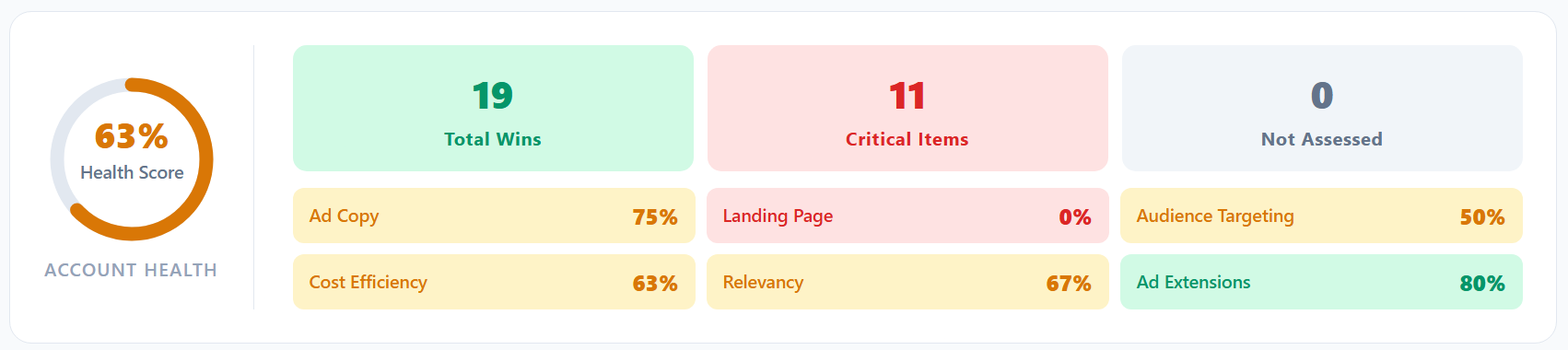
Across all 25 audits, the average AuditIQ by BidWaves health score was 60%. The range ran from 37% to 70%. Not one account cleared 70%.
That is not because these accounts are run badly. Most had clean brand and non-brand separation, approved ads and sensible campaign structure. The points were lost in the places that are harder to see from inside the interface.
Ad Relevance and Ad Cost Efficiency
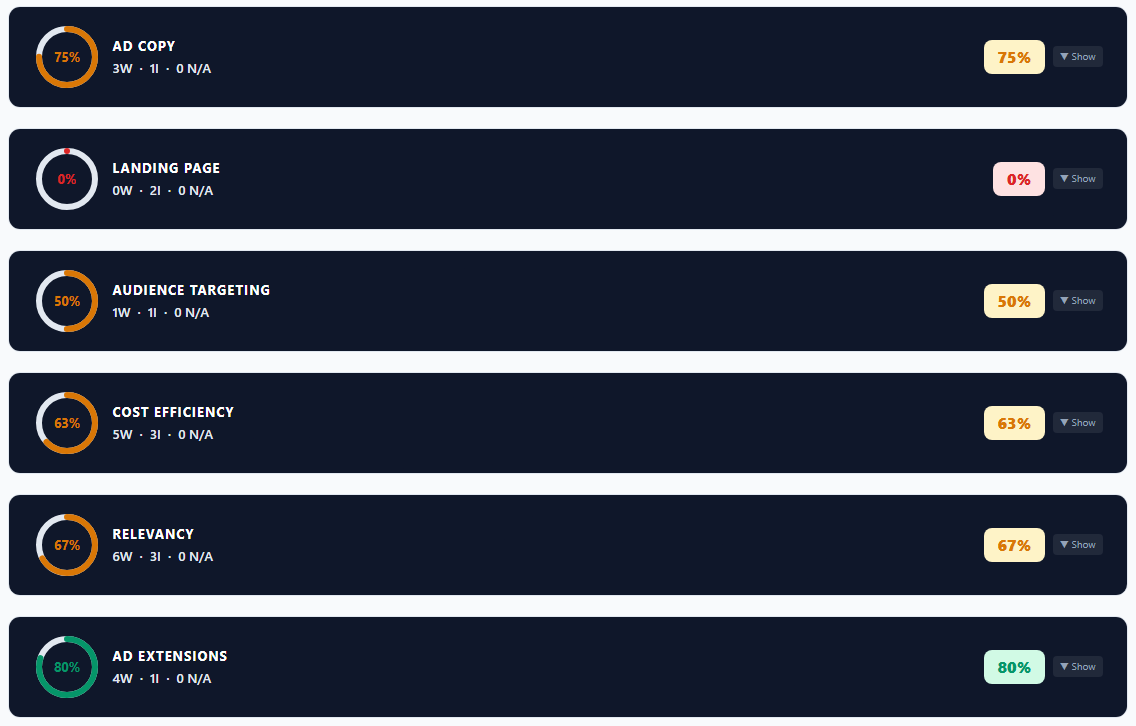
Two categories did most of the damage: Relevancy and Cost Efficiency both averaged 57%. Together they accounted for 79 of the 127 critical items we found across the 25 audits, representing about 62% of all findings.
Relevancy carried the most individual issues (42) highlighting opportunities to improve how well campaigns align with their target audiences.Cost Efficiency revealed problems related to bidding strategies, campaign performance, budget limitations, and conversion volume. These issues can directly affect how effectively advertisers use their budgets and generate results.
Landing pages were the most volatile category. Two accounts scored 0% there, one because every ad URL redirected to a CAPTCHA page and one because a live ad pointed at a 404.
Sample AuditIQ by BidWaves scorecard (detailed findings removed for privacy)
The 5 Common Google Ads Issues That Hurt Campaign Performance
Our analysis for the 25 audits revealed several recurring issues that can affect campaign performance, increase advertising costs, and limit conversions. While some problems were more common than others, the following five findings highlight areas advertisers should pay close attention to.
Look closely and all five are conversion problems wearing different clothes.
1. Losing Auctions to Ad Rank
Every single account lost meaningful impression share to ad rank on non-brand terms. A B2B industrial account was missing 75–82% of available impressions. Low Quality Scores were usually the cause, and Quality Score leans on landing page experience. If the page is slow, redirected or broken, you pay more per click to win fewer auctions, and the conversions you do get cost more.
2. Campaigns Limited by Budget
Ten of 25 accounts had campaigns running out of money before the day did. When a campaign is budget-capped, it drops out of auctions partway through the day and the bidder has less room to find cheaper conversions. You end up paying more per conversion than you should.
The worst case was a hospitality account. Its wedding campaign produced 137 conversions on $3,915 while losing 75% of its impressions to budget. Meanwhile, a generic accommodation campaign spent $10,414 for 13 conversions. The budget was going to the wrong place, and only conversion data could show it.
3. Smart Bidding Without Statistical Significance
Eight accounts had campaigns on Maximize Conversions with fewer than 15 conversions a month, which is the floor of AuditIQ by BidWaves flags. Our own bar is stricter: 30 conversions per campaign every 30 days. Below that, the algorithm is not learning. It is guessing, and you are paying for the guesses.
Hold accounts to 30-in-30 and nearly all of them have at least one campaign short. The fix is usually consolidation, not more budget: fewer campaigns, denser data.
4. Broken or Inaccurate Google Ads Conversion Tracking
This is the big one, and it gets its own section below. Seven accounts showed it in some form: conversion actions marked removed, soft actions counted as leads, or a CPA so far from target that the measurement itself was the likelier problem.
5. Wasted Ad Spend on Search Terms With No Conversions
Six accounts were paying for search terms that never converted. One spent $288 on a single broad-match camping term with nothing to show for it. Another spent $271 across 16 consumer and DIY queries in a B2B account. These are easy to cut, but only if you trust that "zero conversions" really means zero. If tracking is broken, your negative keyword list is built on bad data too.
What Causes Google Ads Conversion Tracking to Stop Working?
Conversion tracking issues are not always easy to identify, especially when campaigns continue running and reporting results. Our audits uncovered several examples of tracking problems that either prevented conversions from being recorded or caused accounts to report misleading performance data.
Nobody turns off conversion tracking on purpose. It breaks because something around it changed and nobody told Google Ads. Here is what the audits caught:
- Conversion actions that disappeared. A hospitality account reported 185 conversions, but only 35 were tracked purchases. Its booking and call conversions had been marked removed. Against a $20 target, the real CPL was $507.
- One action left standing. A B2B software account had 9 of its 10 conversion actions removed or hidden. Only calls from ads were still counting, so every form fill was invisible to the bidder.
- Forms behind a wall. A home services account had every landing page redirected to a CAPTCHA. Visitors and Google's crawler both hit the wall before they reached a form.
- Ads pointing at dead pages. One live ad URL returned a 404. Every click on it was paid for and could not convert.
- Soft signals counted as leads. A B2B industrial account was optimizing toward file downloads, "learn more" clicks and case study views. 179 of its 237 conversions were downloads.
The numbers can be wrong in the flattering direction too. Two accounts reported CPAs 31x and 41x better than their targets. That is either a business that sets its target badly, or a tracking setup counting things that are not really conversions. Either way, it is worth checking before you scale.
What Usually Causes It
In our experience, the culprit is rarely Google Ads itself. Instead, they often result from changes to the systems and tools connected to it.
Some of the most common causes include:
- The form changed: A new form tool, a renamed field, a new thank-you page URL. Any of these can break the trigger your conversion depends on.
- The website changed: Redesigns and migrations drop tags, swap tag manager containers, or move pages without updating ad URLs.
- The website went down: Even a few hours offline is paid traffic that cannot convert, and a few days teaches the bidder that your campaigns stopped working.
- The CRM stopped passing data: If you import offline conversions, the import is only as reliable as the CRM behind it. When it breaks, Google sees a sudden drop in conversions and reacts to it.
These issues can go unnoticed while campaigns continue spending money. When inaccurate conversion data starts influencing automated bidding decisions, the impact can extend well beyond the initial tracking problem.
Real Example: How a Form Update Broke Conversion Tracking
One of our clients had lead forms that switched from being in an iframe to launching in standard HTML. We were not notified, but after a couple days, we noticed leads had stopped coming in and never made it back to Google.
Conversions were triggered via Google Tag Manager and the trigger failed due to the technical difference in form setup.
From the algorithm's side, the campaigns simply stopped converting. Left alone, smart bidding would have treated that week as real. It would have pulled back on traffic that was actually working, and the data would have kept skewing bids long after the leads came back.
So we removed the week. We went into Data Manager in Google Ads and cleared out the period when the data was down, so the bidder would not learn from it. Once the lead trigger was restored, the account picked up from clean data instead of a week of false zeros.
The lesson is not about one client. Any outage, whether it is your site, your forms, your tag manager or your CRM, creates a stretch of bad data. Fixing the break is step one. Making sure Google does not learn from the broken window is step two, and most advertisers skip it.
How to Check if Google Ads Conversion Tracking Is Working
You do not need a full audit to find out whether your tracking is lying to you. Start here:
- Review your conversion actions. Open Goals and look for anything removed, hidden or set to secondary that should be primary. Confirm you are optimizing toward leads or sales, not page views.
- Submit your own form. Fill it out on desktop and mobile, then confirm the conversion recorded. Do this after every site or form change.
- Check your landing page URLs. Look for 404s, redirects and anything that puts a wall between the click and the form.
- Compare Google to your CRM. If Google says 185 conversions and your CRM says 35 leads, one of them is wrong.
- Look for flat lines. A sudden drop to near zero is rarely a market shift. It is usually something broke.
- Clean up outage windows. If tracking was down, remove that period before the bidder learns from it.
- Count conversions per campaign. Under 30 in 30 days? Consolidate before you trust smart bidding with it.
Find Google Ads Tracking Issues With AuditIQ by BidWaves
AuditIQ by BidWaves connects to your live Google Ads account, reviews 90 days of data against 38 criteria, and flags conversion tracking, budget and landing page issues in about three minutes. Run a free AuditIQ by BidWaves audit and see what your conversion data is really telling Google.
Why Accurate Conversion Tracking Matters for Google Ads Performance
Every automated bidding decision Google makes rests on your conversion data. Budget allocation, keyword pruning and campaign consolidation all depend on it too. When tracking breaks, the account does not stop. It keeps optimizing, just toward the wrong thing.
That is why broken conversion tracking is the most expensive thing AuditIQ by BidWaves finds. It does not waste a line item. It quietly bends every decision downstream of it.
Need Help Getting Your Conversion Data Right?
If you are not sure your Google Ads conversions match what is really happening in your business, contact us. We can help you find the gaps, fix the tracking, and clean up the data your campaigns have already learned from.
.png)