



We’ve been asking for more control in Google Ads as the platform continues to shift toward automation and AI. For Performance Max (PMax), advertisers have historically lacked both visibility and control over specific channel delivery. However, in late August, a new Channels setting began quietly rolling out to a small number of accounts.
Here is what it does, what it doesn't do, where to find it, and how to test it.
What are the New PMax Channel Controls?
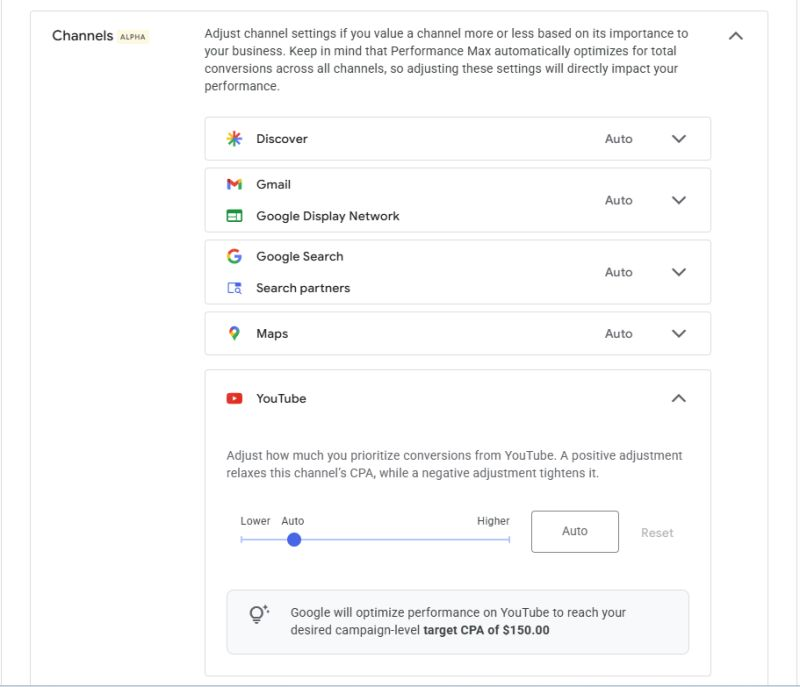
The Channels setting adds a per-channel adjustment for:
- Search and Search partners
- YouTube
- Google Display Network and Gmail
- Discover
- Maps
The controls have a simple three-position choice: Lower, Auto, Higher. You make adjustments to each channel individually.
Where to Find the Channels Setting
You have to go into the campaign itself:
- Step 1: Open Google Ads and go to Campaigns
- Step 2: Click into the individual PMax campaign you want to adjust
- Step 3: Open Settings for that campaign
- Step 4: Look for a new Channels section
If the Channels section is not there, your account is not in the alpha. Google has not formally announced it or published a timeline for beta or general availability. If it's not there, ask your Google rep about receiving access. You should also check every active PMax campaign because access may not appear across the entire account at once.
This Is Not a Budget Split
You are not assigning a certain percentage of your budget to Search and Display, for example. Instead, a positive adjustment tells Smart Bidding that conversions from that tactic are worth more to your business. A negative adjustment tells the system to place less value on that channel, which can change how aggressively it bids for that traffic.
If you dial up Display and it is never going to convert, the system may pay more for traffic that still does not produce qualified results. These controls do not create demand. They change how aggressively the system values and competes for available demand within each channel.
The Other Control: Turning Off Search Partners and Display
A second alpha test has also been appearing in accounts since mid-July.
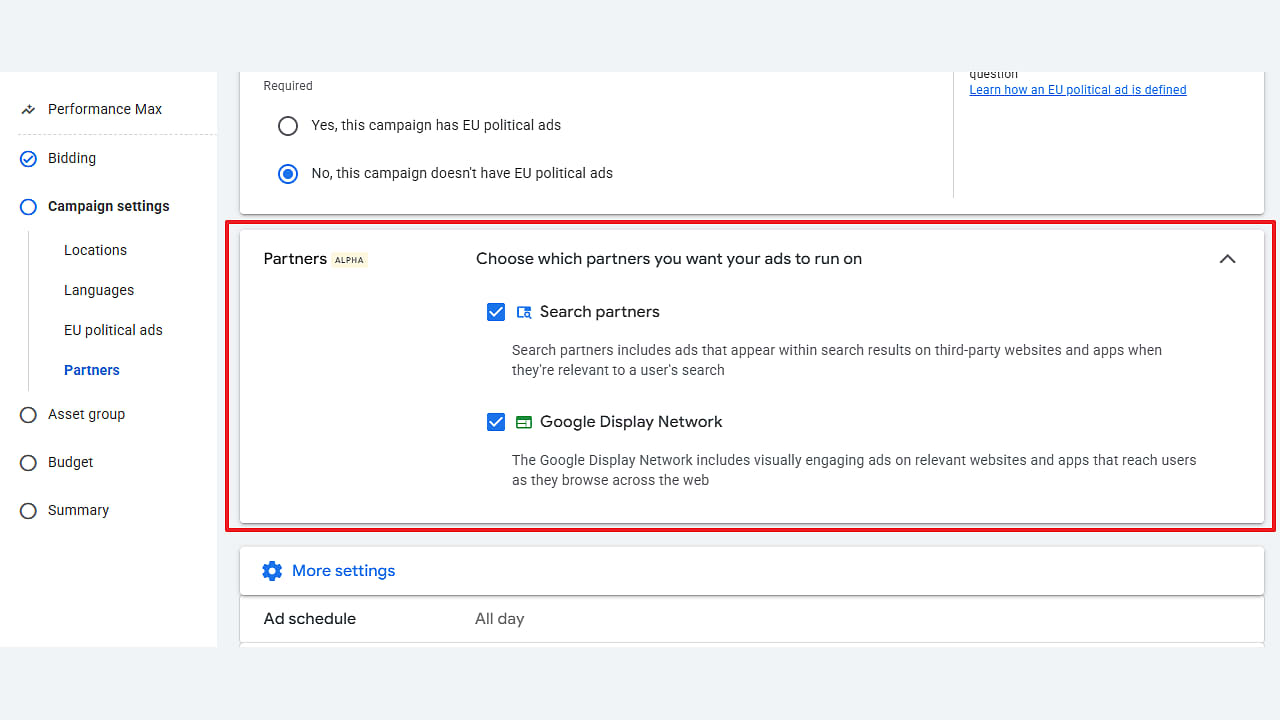
A Partners setting has been showing up in PMax campaigns, labeled "Partners (Alfa)" in the test interface. It adds two independent checkboxes, one for the Search Partner Network and one for the Google Display Network. Both are checked by default, so nothing changes in your account unless you actively uncheck one.
Where to find it: Same path as above, but instead of the Channels section, look in the campaign's Other settings area, below Locations and Languages.The section is collapsed by default, so you may need to expand it before the options appear.
PMax has bundled both networks into every campaign since it launched in November 2021. Advertisers historically had to accept both networks, with placement exclusion lists serving as one of the few available ways to limit unwanted inventory. A campaign-level opt-out is a genuinely different category of control.
Treat these as two separate updates. The Channels setting nudges the bidder. The Partners setting removes inventory entirely.
Can You Finally See Conversions by Channel?
Yes, this is the update we are most happy about, and it is recent enough that plenty of advertisers still do not know they have it.
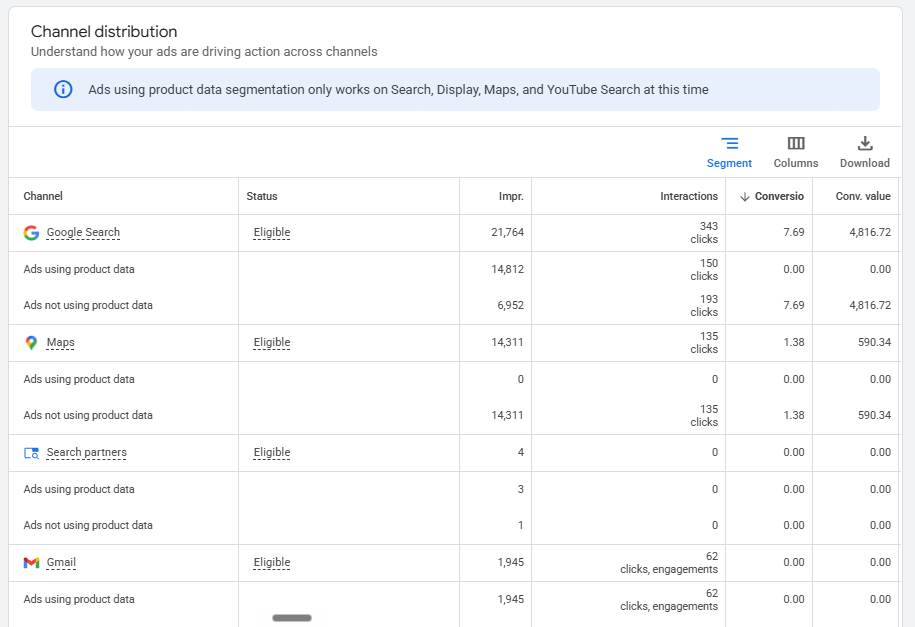
For years the honest complaint about PMax was that you could not see performance by subnetwork. You got cross-network and that was it. That has changed. Channel performance reporting now shows impressions, clicks, cost, conversions, conversion value, CPA and ROAS broken out by channel. Google has since added a cost toggle, network segmentation for assets, and the ability to segment the channel distribution table by conversion action and ad event type.
Where to find it: open the PMax campaign, go to Insights & Reports in the left navigation, then Channel Performance. You will see a performance summary, a channel-to-goals visualization, and the channel distribution table. Turn on the Cost toggle if it is not already enabled. Without cost data, you can see activity but not whether each channel is producing that activity efficiently.
If you have not looked at this report yet, review it before adjusting any of the new controls. This is the data that makes the controls usable, and it is why the sequence Google followed here makes sense: visibility first, then control.
What Is Still Missing
Two gaps remain, and both affect how you should read the new controls.
Attribution still flatters the bottom of the funnel. When the channel table credits Search with a conversion, that is where the conversion was recorded, not necessarily the channel that originally influenced the customer. A YouTube or Discover impression that contributed to a later branded search may ultimately appear as Search performance.
As a result, channel-level CPA can make lower-funnel surfaces look stronger while understating the contribution of upper-funnel channels.
That is exactly the metric a CPA tolerance slider is built to move. If you optimize against that number without considering assisted conversions, you could reduce spend on a channel that is helping create demand for the channel receiving the final conversion credit.
Placement reports still carry no conversion data. You can see domains and impressions, but that information only tells you where ads appeared. It does not tell you whether those placements generated valuable conversions.
You Do Not Need Google to Own Your Upper Funnel
The standard defense of PMax Display and YouTube spend is the assist argument: upper funnel does the work, lower funnel grabs the conversion, so leave it alone. If your upper funnel lives inside Google, that flow is real and we plan around it.
But it is worth naming the assumption buried in that argument. It assumes Google has to be the one doing the upper funnel work.
It does not. Programmatic display, CTV and OTT, paid social, and traditional channels can all carry awareness, and in some accounts, they may provide stronger control and transparency than PMax inventory. You can gain clearer placement transparency, cleaner inventory controls, stronger brand safety tooling, and measurement you can audit more directly.
That is what makes these new controls genuinely useful rather than just interesting. If your display strategy is being handled deliberately somewhere else, dialing PMax Display back is not necessarily cutting your upper funnel. It may simply remove overlapping spend from a channel you are already managing through another platform or campaign.
So the decision is not "does upper funnel matter." It does. The decision is which vendor should own it, and whether you want that spend blended into a PMax CPA or sitting in a line item you can measure on its own.
Where PMax Actually Earns Its Keep
Before you start pulling levers, be honest about whether the campaign type fits the account. In our accounts the pattern has been consistent:
- Retail and shopping: Strong
- Ecommerce: Strong
- General brand demand: Good
- Lead gen: Mixed
- B2B: Consistently weak
We understand there are many factors that affect PMax performance and that individual results will vary, but the biggest issue we see comes down to input volume and quality. Performance Max often underperforms for B2B lead generation because its algorithm depends on high-volume downstream conversion data rather than search intent. When a campaign brings in 100 raw leads but only five turn into customers, optimizing for top-of-funnel submissions creates a negative feedback loop where Google targets low-quality volume. Unless an account has the budget and CRM integration to feed back at least 30 qualified conversion signals per campaign every 30 days—such as sales-qualified leads or closed revenue—PMax lacks the data density needed to make smart bidding decisions.
One of the biggest challenges is that platform conversion data does not always reflect lead quality. We have watched PMax push heavy volume into mobile app and gaming inventory on the Display Network that converted beautifully on the surface and fell apart in the CRM. Those campaigns generated form fills that never became qualified leads. Possibly bots, possibly accidental taps on a game screen. Either way, the platform reported success.
That is the single strongest argument for having a Partners toggle and using it.
PMax also still absorbs branded search in ways that make blended CPA look far better than incremental performance actually is. Brand exclusions and negatives used to require a support ticket and no longer do.If they are not live on every PMax campaign, consider fixing that before testing these new controls. Clean up the attribution before you start tuning the bidder, or you may optimize toward a CPA that overstates the campaign's true incremental value.
How to Test the New Controls Without Fooling Yourself
Do not tune a slider and read the platform report a week later. A short before-and-after comparison can easily make normal performance variation look like a meaningful result.
Baseline first. Pull placement reports and channel performance for 60 to 90 days before you change anything. Document your current channel mix, conversion volume, CPA, ROAS, and downstream lead quality so you have a clear comparison point.
Clone, do not edit. Duplicate the campaign, apply the adjustment to the clone, and run them in parallel. Editing in place destroys your comparison.
Judge on downstream metrics. SQL rate, CAC on closed revenue, lead-to-opportunity rate. Platform CPA is the metric the lever was designed to move, so it should not be the only metric you use to determine whether the change improved business performance.
Respect the volume math. Most accounts do not have the conversion volume to detect a real difference inside 30 days. If you cannot reach a meaningful sample, small performance changes may simply be statistical noise rather than evidence that the control worked. Size the test before you run it, or run a holdout instead.
One dial at a time. Channels adjustment or Partners toggle. Do not change both at once, and avoid combining either test with a target CPA or ROAS change.
Audit Your Search Campaigns Before Making More Changes
Not sure what is helping or hurting your paid search performance? Test your campaigns with AuditIQ to identify potential issues and opportunities across your search campaigns before you make your next optimization decision. Try AuditIQ and see what your account may be missing.
The Question to Ask Before You Touch Any of This
More control is only worth something if your conversion data is worth something.
If PMax is optimizing toward raw form fills, a CPA tolerance slider will help it buy more raw form fills more efficiently. If a meaningful share of your spend is going to placements that never convert, a channel nudge will not fix that. Neither will a Partners toggle, although removing poor-quality inventory may give you more control over where that spend goes.
So before you chase alpha access, ask whether your account is ready to use the control. You should have qualified conversion signals, brand exclusions, clean placement exclusions, and a reliable way to measure downstream lead or revenue quality. Get those right and these new levers become genuinely useful. Skip them and you risk optimizing the campaign more aggressively toward signals that do not reflect real business value.
Our take on Google: Keep going. The reporting has improved meaningfully over the last eighteen months and the controls are finally catching up. What advertisers still need is subnetwork-level conversion data and an honest incrementality signal, not another tolerance dial. Give us the granularity to make the call, or make the call and show us the math.

Need Help Getting More From Google Ads?
More controls do not automatically mean better performance. If you need help understanding where your Google Ads budget is going, improving campaign quality, or deciding how PMax fits into your broader paid media strategy, contact us. We can help you turn better visibility into smarter campaign decisions.
.png)